● InterviewCoach AI · open source · MIT
Walk into every interview already rehearsed.
A private, open-source rehearsal studio: real-time voice interviews with an AI that knows your resume, feedback that refuses to lie, coding practice, and a system-design arena — running locally in your browser.
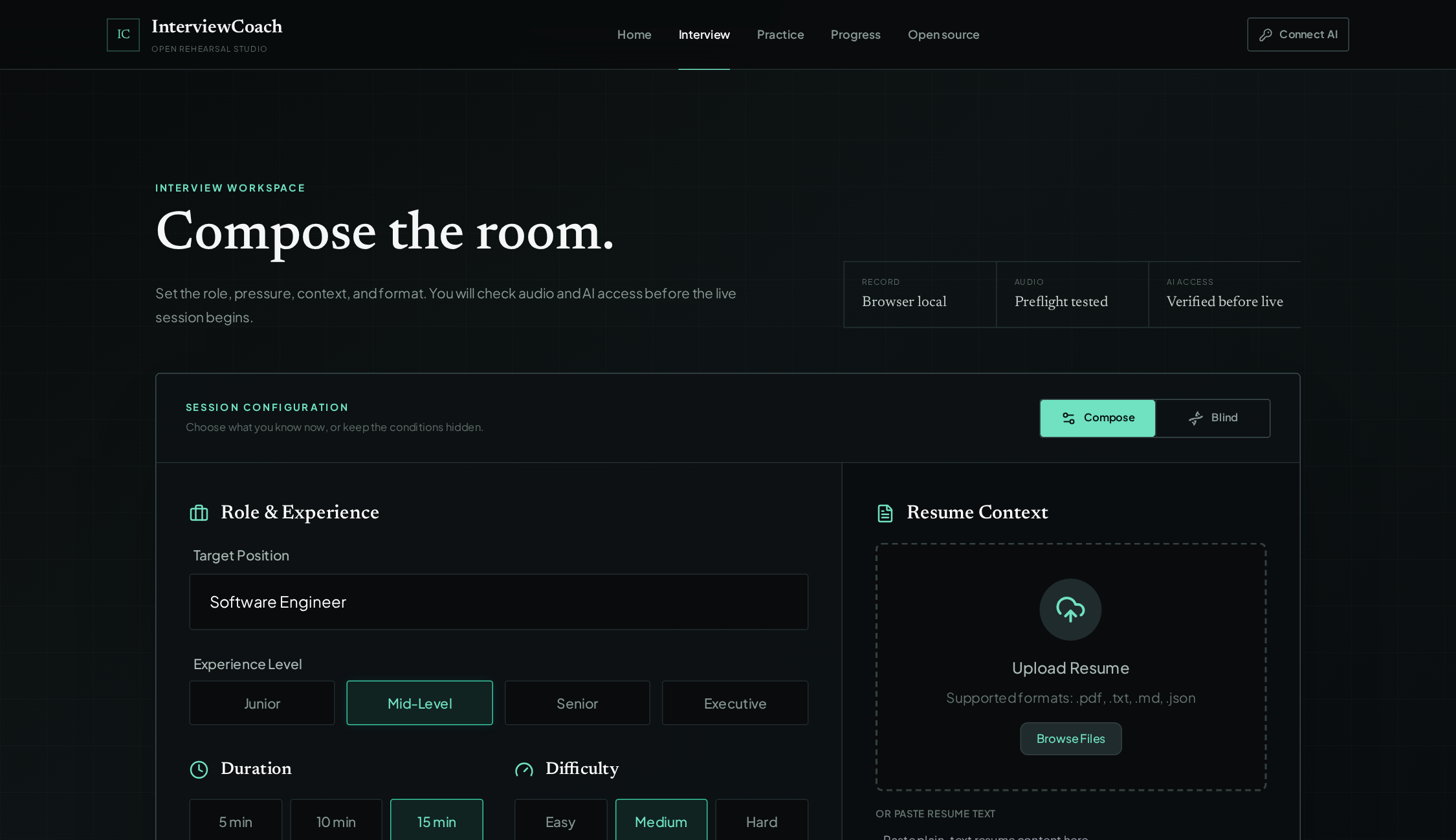
practice modes — role, seniority, difficulty, duration, company track, campus, blind, demo
built-in company tracks, from campus placements to Google and Amazon loops
practice pillars — voice interviews, coding arena, system-design canvas
cloud sync. Your interviews, reports and resume stay in your browser
The problem
Interviews are won before you walk in.
And almost nobody gets to rehearse under anything close to real conditions. That's the gap InterviewCoach AI exists to close.
High-stakes, low-rep
You get a handful of real interviews a year, and each one bends months of your trajectory. The pressure is real; the chance to practice under it is nearly impossible to arrange.
Friends are awkward, coaches are expensive
Mock interviews with friends are kind and forgettable. Professional coaches charge real money per session — and they're booked out when you need them most.
Question banks don't know you
Generic lists ask generic questions. Nobody asks about the migration on your resume, the outage you debugged — until the real interviewer does, live, while you're sweating.
Hero feature
Talk. Get interrupted. Recover. Like the real thing.
Real-time voice interviews over the Gemini Live API — not a chatbot with a microphone taped on. The interviewer speaks, listens, and pushes back while you're still talking.
- ⚡
Natural interruption
Ramble, and the interviewer cuts in — the way a real one would. Conversation, not turn-taking.
- 📝
Live transcription
Every word captured as it's spoken, so nothing you said well gets lost to nerves.
- ⏸
Pause, resume, reconnect
Life interrupts. Pause mid-answer, resume cleanly — and if the connection drops, the session reconnects and recovers instead of dying.
- 🎧
Hardware preflight
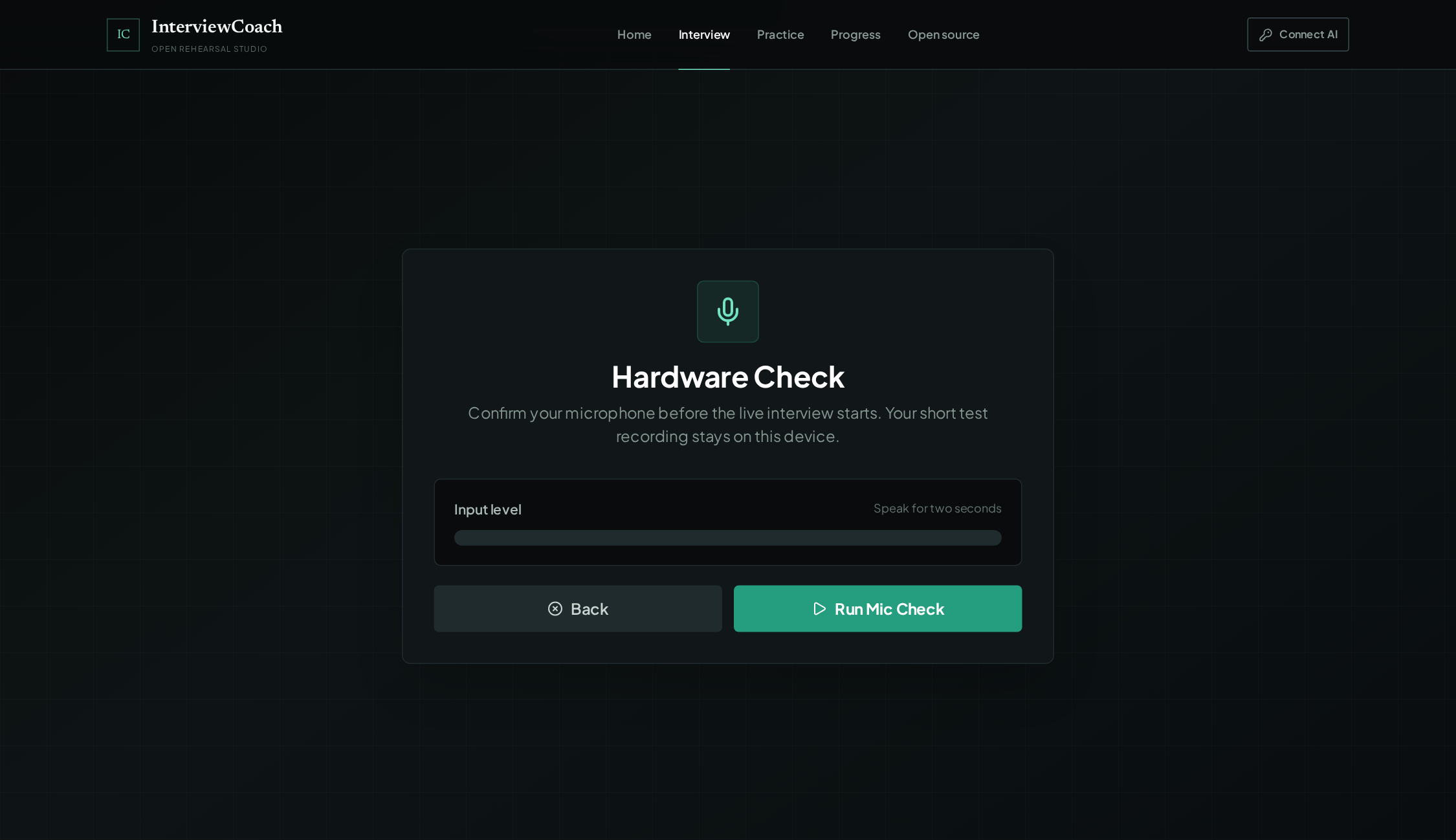
Before you start: record your mic, play it back, verify the signal. No discovering your audio was dead five minutes into a mock.
Voice pipeline from docsFrom the docsCapabilities stated in the project's README and implemented over the Gemini Live API.
The voice orb, stylized. illustrativeIllustrativeA stylized depiction of the live-audio visual, not a product capture.
Resume-aware
It read your resume. All of it.
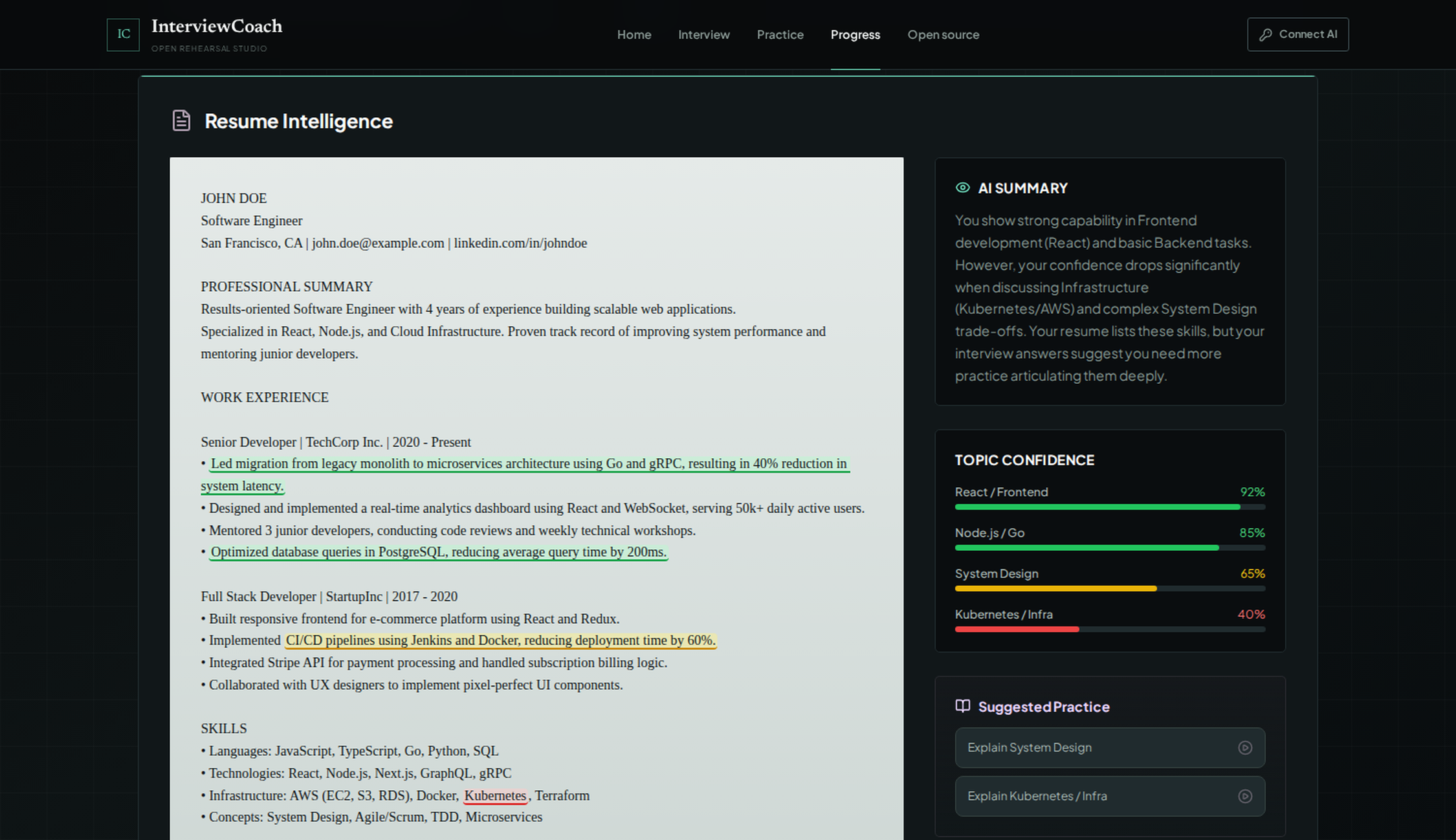
Drop in a PDF and the interviewer stops asking "tell me about yourself" and starts asking about your migration, your outage, your trade-offs — the questions the real interviewer will actually ask.
- 📄
Parsed locally, in your browser
Resumes are extracted with a local PDF.js worker — 5 MB and 20 pages max. Your file is only ever sent to Gemini as interview context, never stored anywhere.
- 🎯
Questions about your experience
The session is grounded in what you've actually built. Defend your own decisions, explain your own architecture.
- 📊
Topic confidence, honestly shown
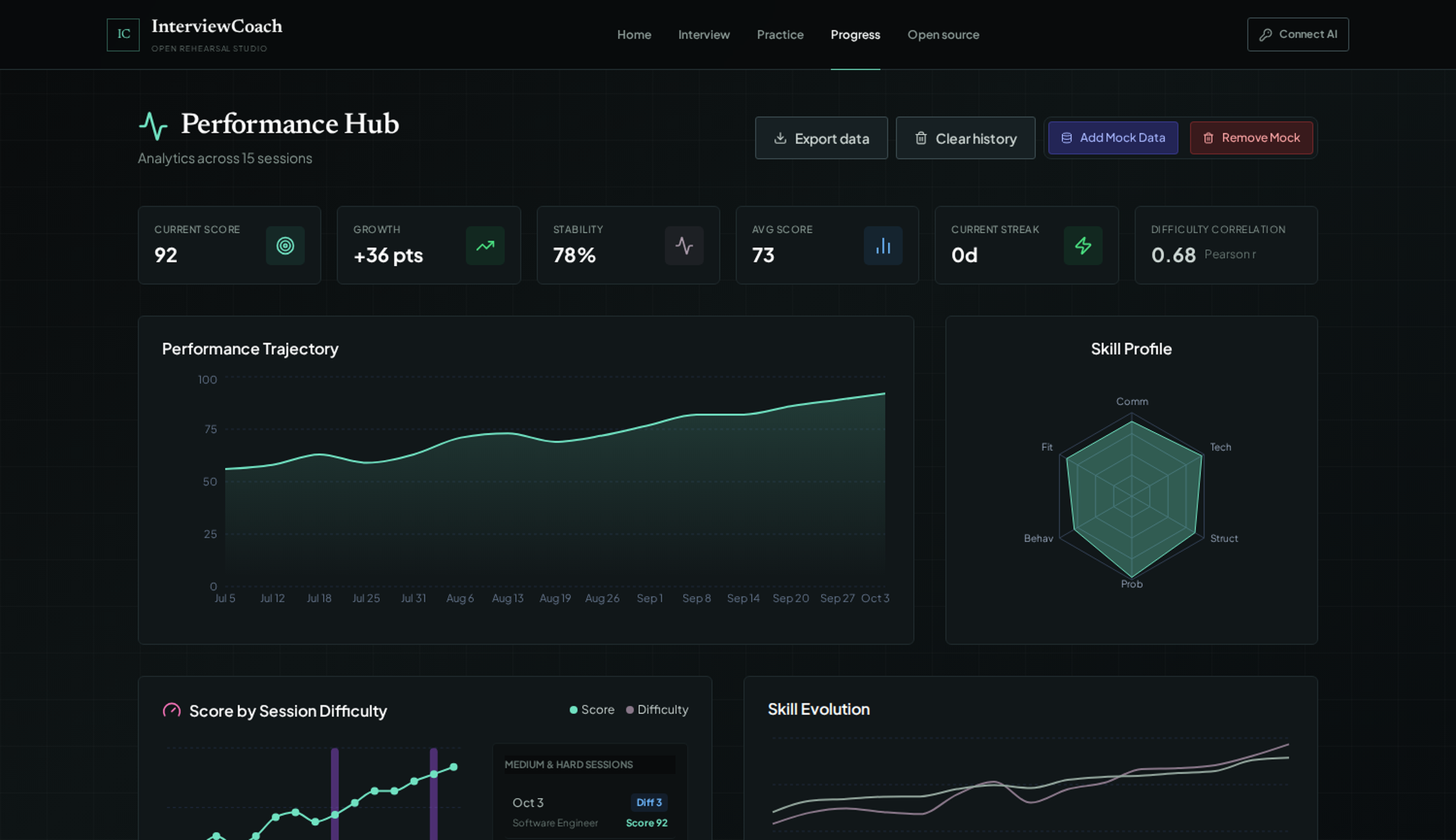
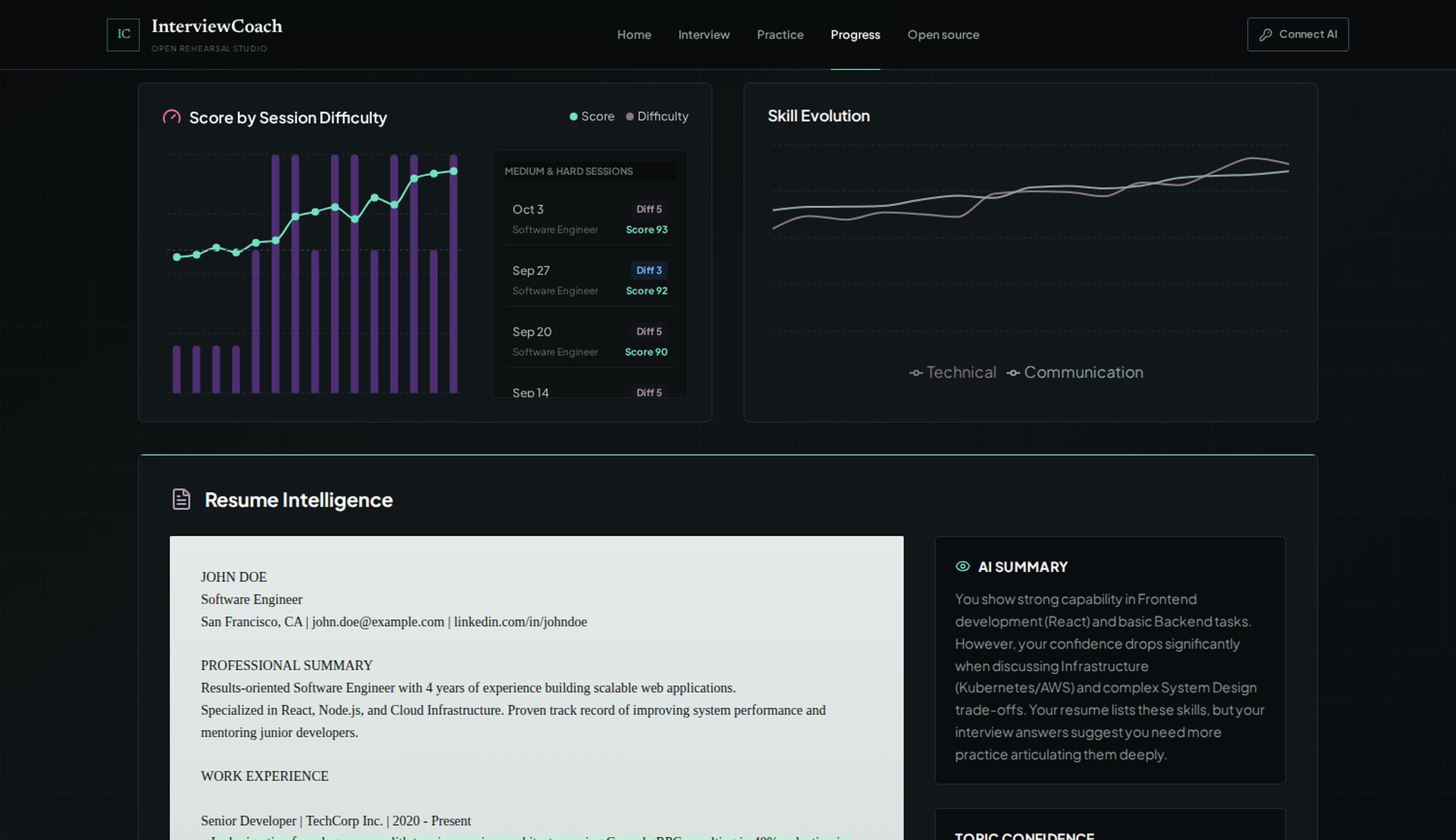
The dashboard shows where your answers hold up and where they wobble — per topic, with suggested practice for each gap.
Resume pipeline from docsFrom the docsLimits and behavior stated in the project's README.
Feedback
Feedback that refuses to lie.
Every report is validated before it's displayed or saved. Missing or malformed scores are not fabricated — if the evidence isn't there, the report says so.
- 🔍
Evidence-validated reports
Scores trace back to what you actually said. No confident-sounding numbers invented to fill a template.
- ⭐
STAR review
Your behavioral answers are broken down Situation → Task → Action → Result, so you can see exactly where the story lost its shape.
- 🗺
Study plans that target you
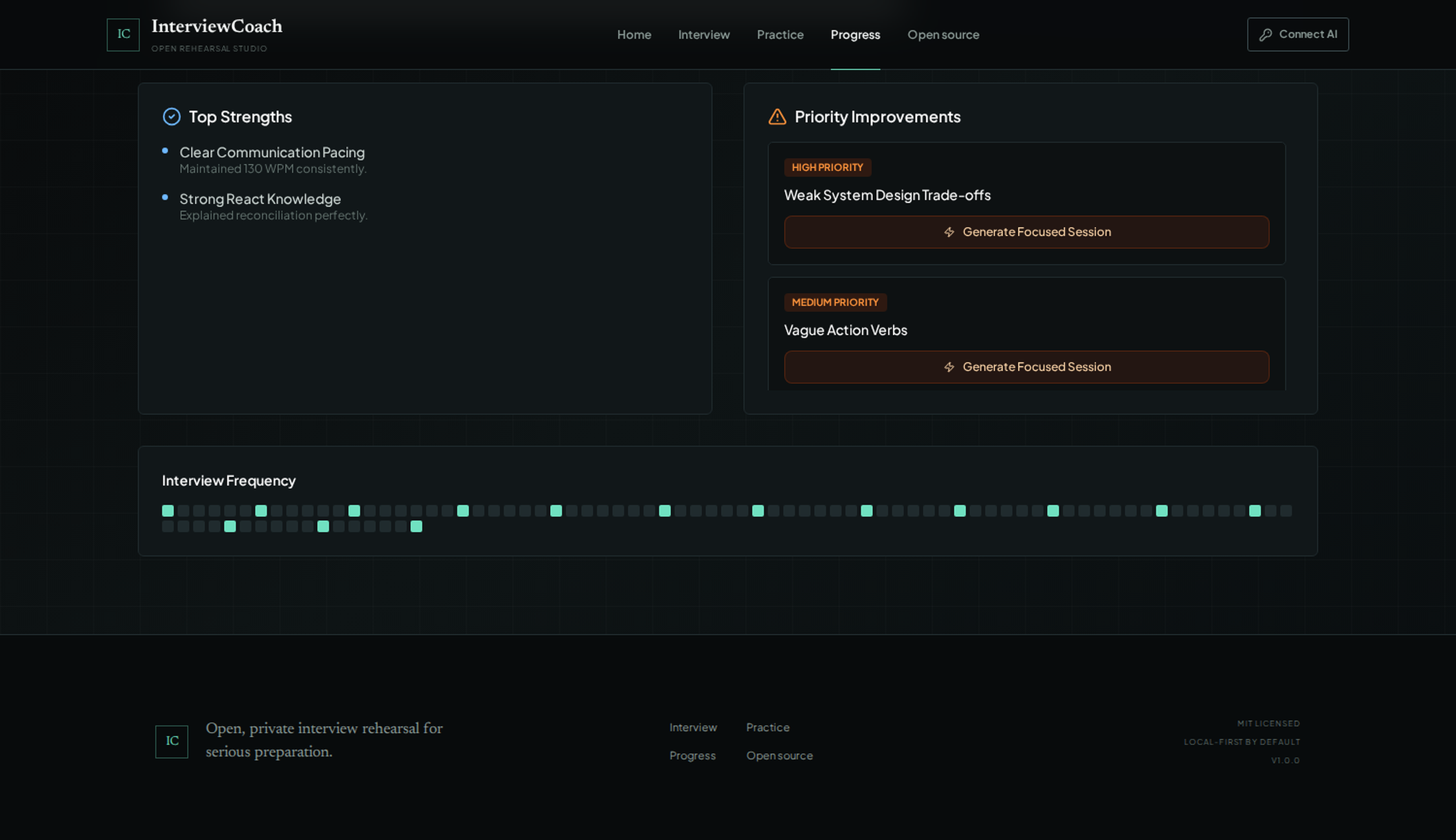
Weak on system-design trade-offs? The plan says so, and generates focused sessions to fix exactly that.
- 📈
Progress history
Session-over-session tracking — pressure resilience, skill evolution, interview frequency — so you know whether you're actually improving.
Practice arena
A coding gym with a spotter.
JavaScript challenges run in a disposable, time-bounded browser Worker — three seconds, then it's gone. Built for interview practice, with coaching layered on top.
Safe-by-design runner
Your functions execute against JSON-compatible tests inside a throwaway Worker with a 3-second timeout. It's a practice gym, not a sandbox for untrusted code — Python, Java and C++ stay out by design.
Skill diagnostics
An optional diagnostic maps what you can actually do, topic by topic, instead of guessing from a résumé line.
Ranked resources
Learning resources ranked for your gaps, problem recommendations matched to your level, and growth tracking that shows the curve moving.
Arena behavior from docsFrom the docsRunner scope and behavior stated in the project's README.
System design
Whiteboard rounds, minus the whiteboard anxiety.
A full design canvas for the round most candidates fear most — with coaching and scoring built in, so your boxes-and-arrows actually get critiqued.
Navigate freely
Anchored wheel and button zoom, panning, fit and reset view, plus a minimap so you never lose the big picture mid-design.
Draw neatly, fast
Snap grid, auto-layout, starter architectures, duplicate, and full undo/redo. Labels and notes keep the reasoning attached to the diagram.
Take it with you
Canvases persist locally and export or import as JSON; diagrams export as SVG. Coaching and scoring tell you what to fix before the real loop.
Canvas capabilities from docsFrom the docsFeature list stated in the project's README.
Every way to practice
Eight ways to walk in nervous.
Dial in exactly the interview you're afraid of — or let the app surprise you.
Role
Target the actual position — Software Engineer today, whatever's next tomorrow.
Seniority
Junior, Mid-Level, Senior, Executive. The questions change because the bar does.
Difficulty
Easy, Medium, Hard. Warm up or get humbled — your call.
Duration
5, 10, 15, 20 or 30 minutes. A coffee-break drill or a full loop.
Company track
Rehearse the actual loop: rounds, tone and focus areas per company. Five built in.
Campus
Placement-season mode: aptitude, coding and HR rounds, Indian campus style.
Blind mode
The AI picks the interview type, personality, difficulty and duration. You find out live.
Demo
A scripted walkthrough — see the whole flow before you commit to a real session.
Company tracks, straight from the data
Each track ships with its real rounds, interviewer tone, focus areas and sample questions — defined in the project's own data/company-tracks.json.
General Campus Placement · India
Tone: clear, supportive, campus-placement oriented.
Sample questions
TCS / NQT Style · India
Tone: structured, fundamentals-first, service-company realistic.
Sample questions
Infosys Style · India
Tone: calm, fundamentals-focused, communication-aware.
Sample questions
Google SWE Style · Global
Tone: precise, collaborative, high technical depth.
Sample questions
Amazon SDE Style · Global
Tone: ownership-oriented, evidence-seeking, direct.
Sample questions
Track data from docsFrom the docsVerbatim from the project's data/company-tracks.json.
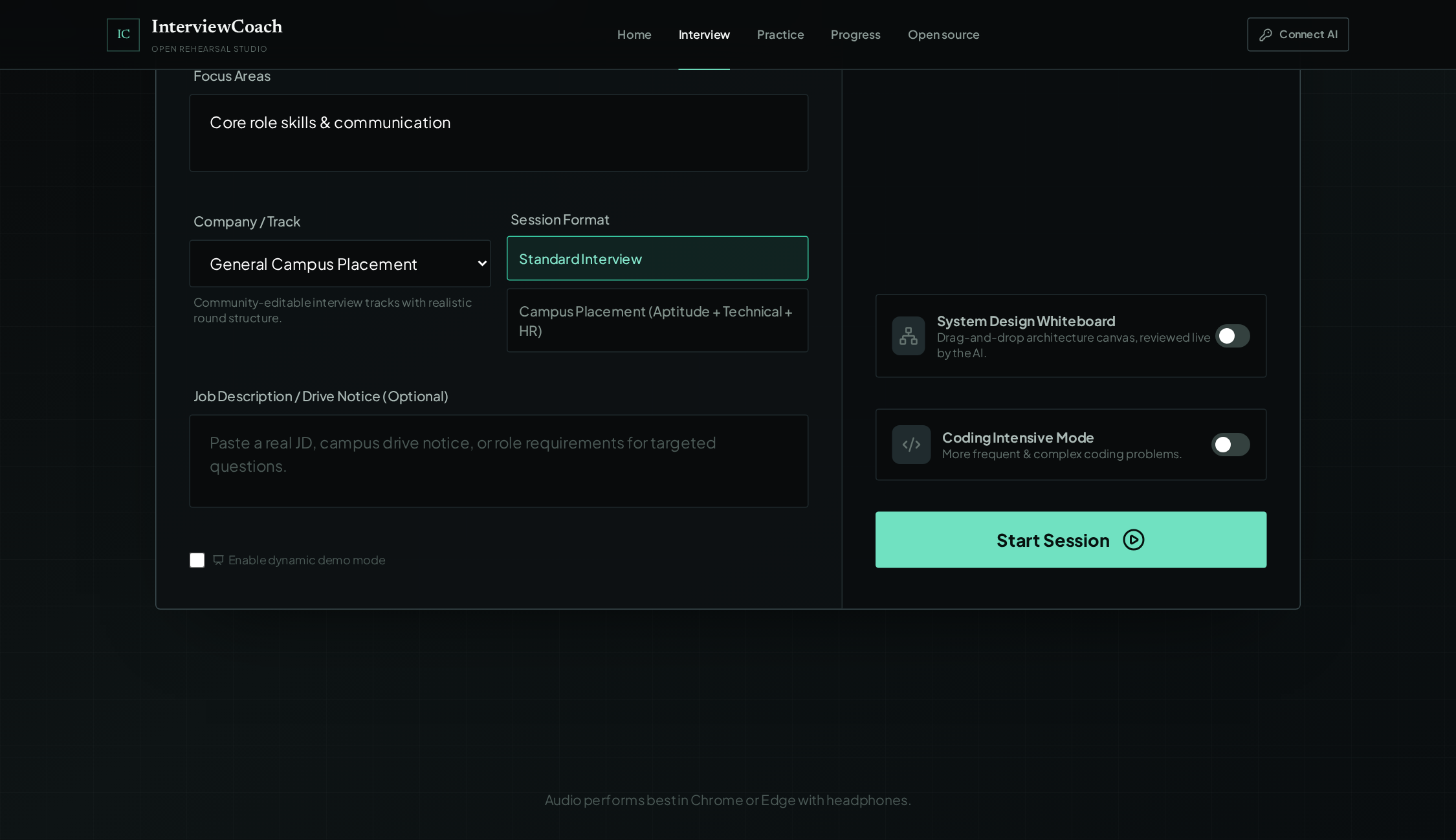
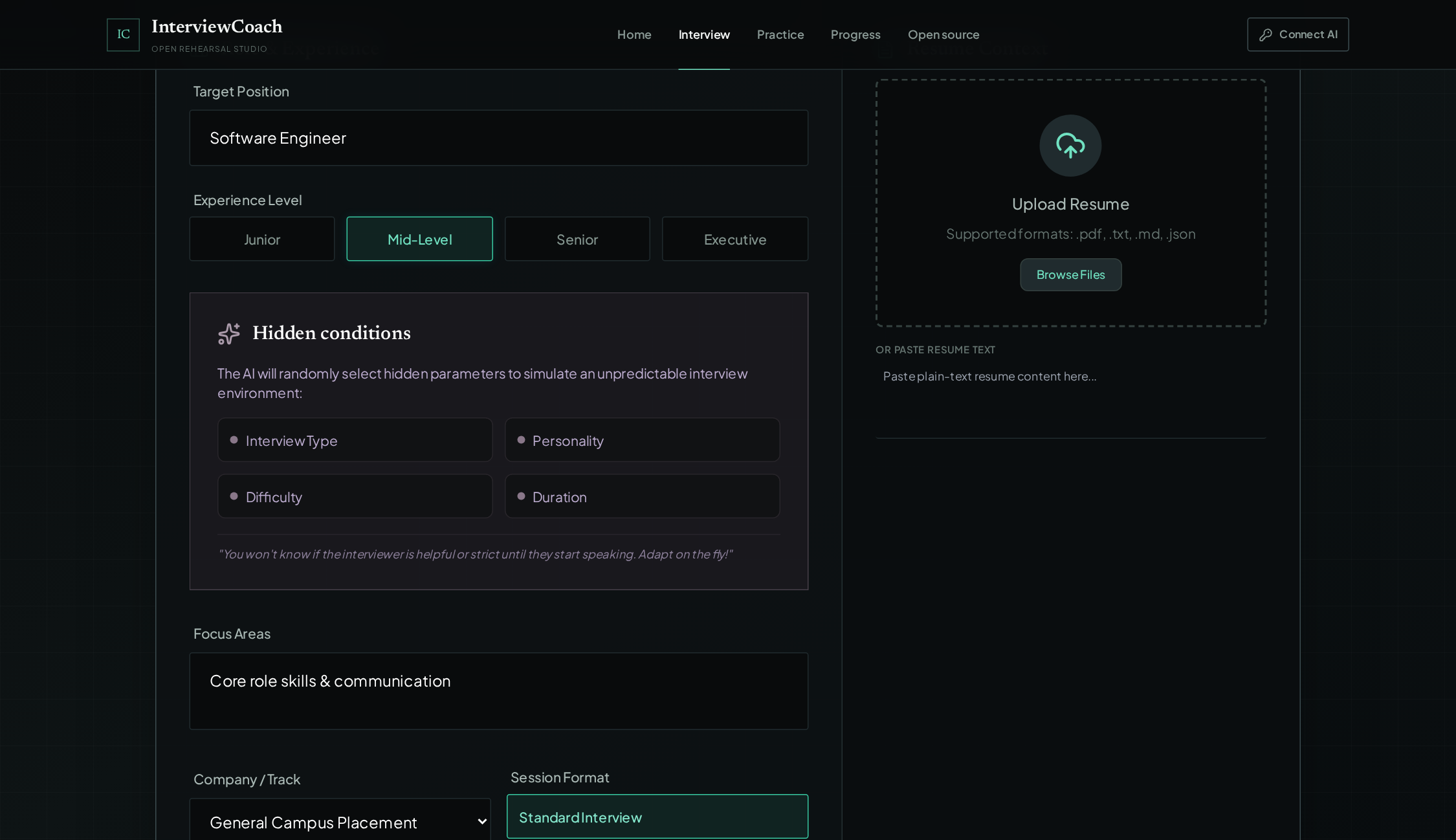
Pick a personality — or don't: Neutral Professional · Very Strict · Calm & Polite · Highly Helpful · Friendly Conversational. from docsFrom the docsPersonalities visible in the product's setup screen.
Privacy — the differentiator
Your rehearsal stays yours.
You're uploading your resume and stumbling through answers out loud. That deserves architecture that treats your data like it matters — because the design does.
- 🔑
The deployment key never leaves the server
GEMINI_API_KEY lives in the Express server's environment. It is never embedded in the client bundle — the release gate even scans the built bundle to prove it.
- 🎟
Voice runs on one-use ephemeral tokens
Live sessions connect with single-use tokens minted by the server. A token can't be replayed, and there's nothing long-lived to steal.
- 🗝
Bring-your-own-key is tab-scoped
Prefer your own key? It lives in sessionStorage for the current tab only — never localStorage, never a database, gone when the tab closes.
- 💾
History stays in your browser
Interviews, reports, skill profiles, in-progress sessions — all in your browser's storage. Active sessions checkpoint every five seconds so a reload recovers safely.
- 📤
Export everything, or erase everything
The dashboard exports all your reports as JSON — or wipes them. Canvases export and import independently. Local-first means you're never asking permission for your own data.
- 🚫
No account, no cloud sync, no telemetry
There is no authentication backend and no cloud sync. (The README is explicit: add authenticated, owner-scoped storage before enabling multi-device persistence.)
- 🛡
A hardened server in front of it all
CSP and security headers, bounded JSON bodies, request timeouts, and per-IP rate limits — 40 text requests and 12 live tokens per IP every 15 minutes.
Privacy architecture from docsFrom the docsStated in the project's README privacy, data-lifecycle and environment sections.
Gallery
The real thing, pixel for pixel.
Every capture below is the actual product — no mockups, no renders. Click any shot to view it full-size.
Setup
Running in four commands.
Requirements
- 🟢
Node.js 20+ · npm 10+
The stack is React + TypeScript + Express.
- 🔑
A Gemini API key with Live access
Voice interviews need the Live API. Everything else in the Practice Arena works without a key.
- 🌐
Chromium · HTTPS in production
Chromium-based browser for the best audio experience; browsers require a secure context for microphone access.
Get a Gemini key
No Google Cloud CLI required:
AI Studio
Open Google AI Studio's API keys page and sign in.
Create key
Choose "Create API key", select a Cloud project if prompted.
Connect AI
In InterviewCoach, choose "Connect AI" and paste the key.
Verify
Select "Verify and use key" — the app makes a small provider request before accepting it.
$ npm ci
# configure — copy .env.example to .env, then set:
GEMINI_API_KEY=…
# start development mode
$ npm run dev
→ open http://localhost:1234
Environment
| Variable | Default | Purpose |
|---|---|---|
| GEMINI_API_KEY | empty | Server-managed Gemini key |
| GEMINI_TEXT_MODEL | gemini-3.8-flash | Text generation, feedback, coaching |
| GEMINI_LIVE_MODEL | gemini-3.1-flash-live-preview | Real-time native-audio interview model |
| PORT | 1234 | Express listening port |
| AI_RATE_LIMIT | 40 | Text AI requests per IP / 15 min |
| LIVE_RATE_LIMIT | 12 | Ephemeral live tokens per IP / 15 min |
| VITE_REPOSITORY_URL | empty | Optional public repo link in the UI |
Docker
$ docker build -t interviewcoach-ai .
$ docker run --rm -p 8080:8080 --env-file .env interviewcoach-ai
# open http://localhost:8080 — put TLS at the load balancer in production
The release gate
npm run check runs the full gate: TypeScript typecheck → behavior tests → production build → client-bundle credential scan → server smoke tests.
Setup reference from docsFrom the docsCommands, variables and defaults from the project's README.
Architecture
Three layers. No black boxes.
The browser does the work it can do safely; the server guards the key and mints tokens; Gemini does the talking. Note what's not here: no auth backend, no database, no cloud sync.
Browser
- React SPA — landing, interview, practice, dashboard, open-source routes
- Web Audio + Gemini Live connection over an ephemeral token
- Local resume parsing in a PDF.js worker
- Local interview and practice persistence
- JavaScript Worker runner for the Practice Arena
Express
- Security headers and per-IP rate limits
- Text-generation proxy — POST /api/ai/generate, /api/ai/validate
- One-use Live token minting — POST /api/live/token
- Config and health — GET /api/config, /api/health
Google Gemini API
- Native-audio live model for voice interviews
- Text model for feedback, coaching and problem generation
Architecture from docsFrom the docsThe layer diagram from the project's README, restyled.
Troubleshooting
Stuck? Start here.
Troubleshooting from docsFrom the docsVerbatim guidance from the project's README troubleshooting section.
Open source
MIT. Fork it. Make it yours.
InterviewCoach AI is MIT-licensed and local-first by design. Run it for yourself, self-host it for your team, or contribute back.
Dedicated routes
Landing, Interview, Practice Arena, Progress dashboard, and Open Source — with SPA deep-link fallback for /interview, /practice, /dashboard and /open-source.
Contributing
See CONTRIBUTING.md in the repo. Security issues follow SECURITY.md — the project takes its own threat model seriously.
Your data, portable
Reports export as JSON, canvases as JSON or SVG, everything erasable. Local-first isn't a slogan here; it's the storage layer.
Licensing & routes from docsFrom the docsLicense and route list from the project's README.